Deep Explainable Mining Intelligence

AI that changes how mine engineers work.

DeXMI empowers your engineers: plain-language answers from the site’s own documents, risk assessments backed by decades of recorded lessons, and safer decisions before every shift, with every answer cited and every action auditable.

You’ll be talking to a mining engineer, not a sales team.

FIG. 01 — AGENT REASONING

Are the LW303 maingate chain pillars (30 × 100 m at 240 m of cover) still within our design criterion?

DeXMI

Reading DeXMI knowledge base

Pillar design guidance · UNSW strength method

3 sections

Reading company knowledge

Strata Management Plan · site design criterion

SMP-02 §4.2

Validating formulas

UNSW 1999 strength · tributary + abutment loading

FoS 2.54 / 1.62

Checking risk register

Pillar and strata risks · published incident notices

2 risks · 1 notice

Within criterion, but marginal under double-abutment loading: FoS 1.62 against your 1.60 criterion (development loading is comfortable at 2.54). One published incident notice matches this geometry; review with your geotechnical engineer before sign-off.

[SMP-02 §4.2 — Pillar design criterion]
Sources
SMP-02 — Strata Management Plan §4.2DeXMI KB — UNSW pillar strength (1999)Hazard register — 2 risks · notice SN-2019-14
DeXMI working a pillar-stability question: every step of the reasoning visible, every claim cited.

Empowering engineers. Never replacing them.

DeXMI’s creation is supported by Optimum Geotechnics: practising mining engineers who spent years on the other side of the table, signing off the assessments this platform now helps draft. DeXMI does the searching, drafting and checking; your people make the calls.

NVIDIA Inception Program Member
Platform

What is DeXMI?

DeXMI (Deep Explainable Mining Intelligence) is an AI decision-support platform for mining operations, created in Australia with the support of Optimum Geotechnics. It connects an AI assistant to your site’s own documents and permitted databases, so engineers ask questions in plain language and get answers with citations: the exact document, section and table each claim came from. It drafts risk assessments from a curated hazard register, runs verified engineering calculations, and checks contractor procedures line-by-line against your own standards.

DeXMI works across underground, open cut and surface operations. It is not a general chatbot: it answers only from sources your site controls, it refuses when those sources don’t support an answer, and nothing you upload ever trains anyone else’s model. Every question, tool call and sign-off is recorded in a complete audit trail.

The problem

Site knowledge is everywhere except where decisions get made.

The answer is on page 214

The management plan covers it, somewhere in 300 pages nobody has time to search before the shift starts.

JSAs on copy-paste

Risk assessments get cloned from the last job, and the lesson from a five-year-old incident notice never makes it in.

Contractor procedures, unreviewed

They arrive days before mobilisation. A genuine line-by-line check against your standards rarely happens.

The spreadsheet’s author left

The calculation still runs the site, and three slightly different versions of it are being emailed around.

Showcases

The product, working. Not a mock-up.

The panels below are the real DeXMI interface, re-rendered with demonstration data from a fictional mine. Watch how the assistant works: it shows its tool calls as it makes them, and every line of output carries its source.

Knowledge bases & citations

AI chat over your site documents, with citations

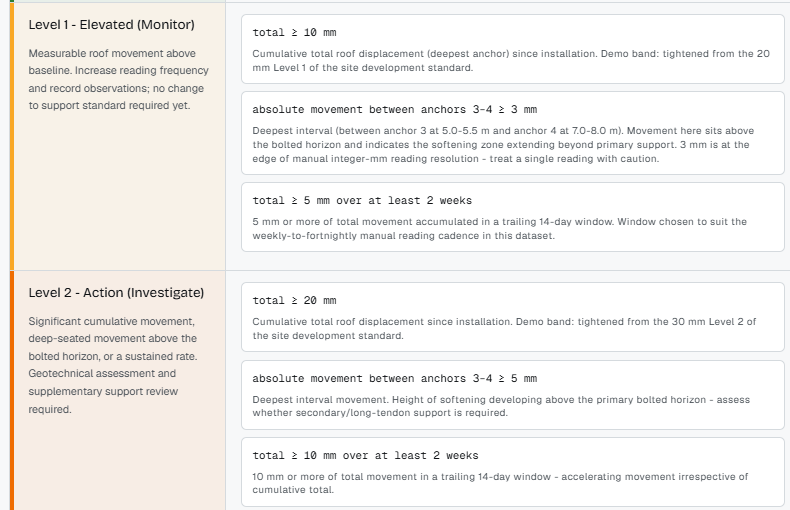
Upload management plans, standards, procedures and manuals into company and private knowledge bases. Ask in plain English; DeXMI reads the documents (tables included) and answers with the exact section it relied on. It queries your permitted site databases too, so document knowledge and live numbers arrive in the same answer.

  • Every answer is cited to the document and section it came from. If it can’t find a source, it says so.
  • Role-based access built in: people only ever see the documents their role allows.
  • It computes, too: ask for the numbers and get the working, with charts.

The answer that took an hour of searching now takes the length of the question.

DETAIL A — ANATOMY OF A CITED ANSWER FIG. 01

1.8% general body methane in the LW302 tailgate return sits in Level 2 of your TARP (trigger band 1.5–2.0%). The plan requires: increase bag-sample frequency to 2-hourly, ventilation officer to investigate the source and report to the underground mine manager before the end of shift, and no hot work inbye the monitoring point.

[VMP-04 §6.3 — Gas TARP, tailgate returns]

↑ the claim carries its exact section. Open the source in one click

Sources
VMP-04 — Ventilation Management Plan §6.3VMP-04 — Appendix B, TARP trigger tablegas_monitoring (site DB) — 168 rows

↑ every source the answer relied on, listed. No source, no claim.

Risk assessments

Risk assessments that carry your site’s memory

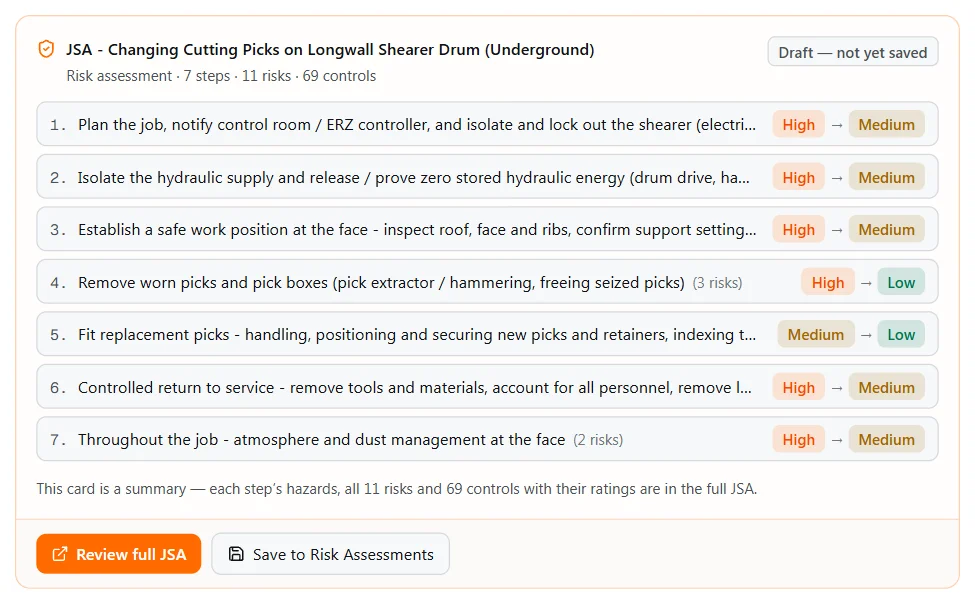
The Risk Assessments module drafts task-based assessments from a curated hazard register: steps, hazards, controls and ratings on the 5×5 matrix your site already uses, and it never invents a risk or a control. The JSA shown here, drafted for a longwall move, is one use case; describe any job and DeXMI builds the assessment the same way, with real incident notices attached where they match.

  • Ask it straight: name a task and see the risks recorded against it, and the recognised controls for each, before the job starts.
  • Real incident warnings attached: when a published safety notice matches a risk in your assessment, your crew sees it.
  • Crews run it in the field on a phone: tick off controls, flag problems, sign off by name.
  • A new safety notice affecting a saved assessment? DeXMI tells you before the next use.
  • Leaves the app in the format auditors expect: the printed form or Excel.

Contractor risk assessments get audited against this. Yours should be the benchmark.

FIG. 02 — JSA DRAFT

Status draft · v1Content drawn verbatim from the hazard register unless marked “On-site” or “AI”

Job Safety AnalysisDeXMI™

TaskRecover powered supports (chocks) from the LW302 face line and relocate them to the LW303 installation face: hydraulic isolation, chock release and lowering, load-out onto chock haulers, and recovery of the final supports at the goaf edge.

TitleJSA — Longwall Relocation, LW302 Recovery to LW303 Installation

StepPotential hazardRiskControlsResidualALARP
1. Prepare the face and isolate chock hydraulics; verify zero energy before breaking any connection.Stored hydraulic energy released while leg circuits are broken: uncontrolled canopy lowering, causing crushing. 1.1Powered Roof SupportsHigh4×3

Isolate and dissipate hydraulic pressure per the energy isolation standard: personal lock and tag for every person on the job. (Ref: QMHD-C-8329 — energy isolation and lockout.)

Prove zero-energy at the test point before any hose is broken.

Medium2×2
2. Release, lower and withdraw the chock from the face line.Uncontrolled chock movement: crush zone between canopy and roof or adjacent support during release. 2.1Powered Roof SupportsCritical5×3

No-go zone during release; operate from the outbye position by remote. (Ref: Safety Alert #299 — worker crushed during powered support relocation; 3 recorded incidents on this risk.)

Minimum two supports engaged either side of the extraction point.

Medium2×2
3. Recover the final supports at the goaf edge.Strata instability and windblast at the goaf edge as the last supports are withdrawn. 3.1Strata Control (longwall)Critical4×4

Goaf edge standing support installed per the strata management plan.

Windblast TARP triggers monitored continuously during recovery. (Ref: Safety Alert #338 — windblast during goaf fall; 2 recorded notices on this risk.)

Medium2×3
Draft job safety analysis for a longwall relocation: controls cite the hazard register and real incident notices.
Curated content inside the Risk Assessments module
1,150+
curated register risks
13,000+
recognised controls
600+
real incident notices, back to 1997
100%
of drafted lines cite their source
Engineering workflows

Your site’s calculations, captured once and rerun forever

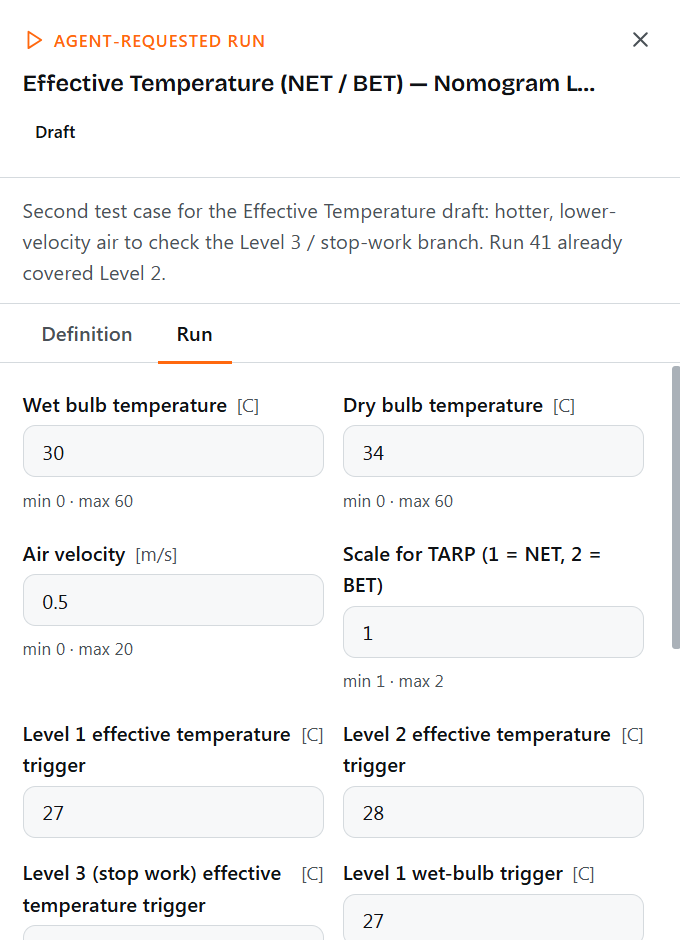
Describe a method once (pillar checks, ventilation numbers, any calculation your team repeats) and the agent assembles the workflow with you, drawing on DeXMI’s mining knowledge, your company’s own documents, or simply your instructions. Verified and published, it becomes a one-click tool the whole site trusts: ask a question in chat and the assistant finds the right workflow, prefills your parameters and shows the working.

  • Assembled with the agent from three sources: DeXMI’s mining knowledge, your own manuals and standards, or plain instructions.
  • Verified by your senior people, then published company-wide: one defensible method, run by every engineer.
  • The assistant uses them too: when a chat question matches a published workflow, it reaches for the verified tool instead of improvising.
  • Workflow by workflow, a growing company library of verified analysis: capability you keep, whoever leaves.

Every week this waits, another spreadsheet version goes walkabout.

FIG. 03 — VERIFIED WORKFLOW

Can you check chain pillar stability for the LW303 maingate? Depth of cover 240 m, pillars 30 m × 100 m, roadways 5.0 m wide, mining height 3.2 m.

DeXMI

This matches a verified workflow in your company library: Chain pillar FoS check (UNSW). I have prefilled your parameters; review the inputs and run it when ready.

Workflow

VerifiedShared · Companygeotechnicalpillar design

Chain pillar FoS check (UNSW)

Computes pillar strength per the UNSW 1999 power law, development and abutment loading, and evaluates factor of safety against the site design criterion.

Reviewed by Principal Geotechnical Engineer

Inputs · prefilled from your message
Depth of cover240 m
Pillar dimensions30 × 100 m
Roadway width5.0 m
Mining height3.2 m
Overburden density2.5 t/m³
Run complete
Validate inputs
Compute pillar strength (UNSW 1999)
Compute pillar loading (tributary + abutment)
Evaluate against design criterion (FoS ≥ 1.60)
Results
Pillar strength (UNSW 1999)18.3 MPa
Development stress (tributary)7.2 MPa
Double-abutment stress11.3 MPa
Development loadingFoS 2.54
Double-abutment loadingFoS 1.62

Design criterion FoS ≥ 1.60 (marker)

Marginal under double-abutment loading: FoS 1.62 against criterion 1.60. Review with geotechnical engineer.

Galvin, Hebblewhite & Salamon (1999) — UNSW pillar strength determination

A chain pillar stability check captured as a verified workflow: parameters prefilled from chat, working shown.
Compliance reviews

Contractor procedures checked line-by-line against your standards

Drop in a contractor procedure and DeXMI reviews it against your own documentation, obligation by obligation, each one graded with evidence-level citations into both documents. Gaps and conflicts are flagged for your reviewer, and the whole run is recorded for audit.

  • Each obligation graded with the exact clause it was checked against.
  • Gaps, conflicts and ambiguities surfaced; the reviewer decides, with the evidence in front of them.
  • Every review run is kept: who ran it, against what, and what changed.

The line-by-line check that never fit the timeline before mobilisation. Now it fits.

FIG. 04 — COMPLIANCE REVIEW

Contractor procedure — Ground Support Installation, Rev 3

Reviewed against: site Strata Management Plan + SHMS standards

23 obligations · 19 aligned · 4 flagged

Aligned

Bolting density in intersections increased per the strata management plan.

Contractor §7.1 ↔ SMP-02 §4.2

Conflict

Exclusion zone during meshing matches the site standard (contractor allows entry at 2 m).critical

Contractor §5.4 ↔ SMP-02 §6.1 — site requires 3 m

Gap

TARP escalation contacts: procedure references a superseded contact list.major

Contractor App. C ↔ SHMS-11 Rev 8

Ambiguous

Torque verification frequency stated as “regular” without a defined interval.minor

Contractor §7.3 ↔ SMP-02 §4.5 — every 25 bolts

A contractor ground-support procedure reviewed against the site strata management plan: verdicts with cited evidence.
Guardrails

How DeXMI stays grounded

AI in a safety-critical industry has to earn trust the same way a new engineer does: show the working, cite the source, and know when to say “I don’t know”. These rules are built into the platform; they are not optional settings.

Mandatory citations

Every factual claim carries the document, section or database table it came from. No source, no claim.

It refuses honestly

If it’s not in your documents, DeXMI says so: it flags low confidence instead of improvising an answer.

Your data stays yours

Each company runs in complete isolation, and your documents never train anyone else’s answers.

Role-based access

People only see the documents and tools their role allows: set once, enforced everywhere, including inside the assistant.

Read-only on your databases

The assistant can query the tables you permit. It cannot modify them: by construction, not by policy.

A complete audit trail

Every question, tool call, source and sign-off is recorded, so “how do we know?” always has an answer.

Jurisdiction

Built for Australian regulatory reality

DeXMI is built where the safety and health management system (SHMS) is a statutory document and the Site Senior Executive (SSE) carries personal obligations. Its drafts speak the language your regulator expects (hazard registers, recognised standards, TARPs, principal hazard management plans), whether you operate under the Coal Mining Safety and Health Act 1999 (Qld), the Mining and Quarrying Safety and Health Act 1999 (Qld) or the Work Health and Safety (Mines and Petroleum Sites) Act 2013 (NSW).

And DeXMI drafts; your appointed people decide. Nothing enters the SHMS without a competent person’s review and sign-off.

Who it serves

Three seats at the same table

Site Senior Executive

Every answer the site acts on has a source and a log entry behind it. When the question is “how do you know?”, the trail already exists.

SHMS & safety managers

JSAs built from the register with incident notices attached, contractor procedures checked line-by-line, and a flag when a new notice affects a saved assessment.

Technical services engineers

Plain-language answers over the whole document set, verified calculations shared across the team, and the working shown for every number.

Positioning

How DeXMI compares to generic EHS software

Generic EHS platforms manage forms and checklists well. DeXMI does a different job: it reads your site’s engineering documents and answers from them, with evidence.

DeXMIGeneric EHS softwarePaper & spreadsheets
Source citations on every answerBuilt in: no source, no claimNot designed for itDepends who you ask
Risk assessment draftingDrafted from a curated hazard registerGeneric template librariesCopy of the last job’s form
Reads your documentsPlans, standards, manuals (tables included)Stores attachments; doesn’t read themManual searching
Engineering calculationsVerified one-click workflows, working shownOut of scopeSpreadsheets that drift apart
Contractor procedure reviewLine-by-line, graded with evidenceAttach and tickManual, if time allows
Audit trailEvery question, source and sign-off loggedForm history onlyNone
Questions

Frequently asked questions

What is DeXMI?

DeXMI is an AI decision-support platform for mining operations, created in Australia with the support of Optimum Geotechnics. Mine engineers use it to chat with their site’s documents (with citations), draft risk assessments (including JSAs) from a curated hazard register, run verified engineering calculation workflows, and review contractor procedures, all with a complete audit trail.

How does DeXMI prevent AI hallucinations?

DeXMI only answers from sources your site controls: your documents, your permitted databases and the curated mining knowledge base. Every factual claim carries a citation to the exact document and section, and when the sources don’t support an answer, DeXMI says so instead of guessing. Risk assessment content is drawn from the hazard register, never invented.

Is our data used to train AI models?

No. Your documents and data are never used to train models, and they never influence answers for any other company. Each tenant runs in complete isolation with role-based access inside it.

Which mining operations does DeXMI support?

Underground, open cut and surface operations. The Risk Assessments module’s deepest curated content today is for Australian coal: a hazard register of 1,150+ risks, 13,000+ recognised controls and 600+ real incident notices back to 1997. The platform answers from your own site documents whatever you mine.

Does DeXMI help with Queensland and NSW compliance obligations?

Yes. DeXMI is built for Australian mining, where the SHMS is a statutory document, including obligations under the Coal Mining Safety and Health Act 1999 (Qld), the Mining and Quarrying Safety and Health Act 1999 (Qld) and the Work Health and Safety (Mines and Petroleum Sites) Act 2013 (NSW). Its compliance reviews check procedures against your own SHMS documentation with cited evidence.

Does DeXMI replace our engineers or safety people?

No. DeXMI drafts, checks and retrieves; your appointed people review, decide and sign off. Every JSA stays a draft until a competent person accepts it, and the platform records who did.

How does an engagement start?

Register your interest via the form on this page. A mining engineer will come back to you within one business day to set up a 30-minute walkthrough. Bring a real job and a real procedure, and watch DeXMI work on your documents rather than a canned example. From there, a pilot on your own site with success criteria agreed up front, then rollout. Pricing scales by site and modules.

What does “NVIDIA Inception member” mean?

Optimum Geotechnics, the engineering practice behind DeXMI, was accepted into NVIDIA Inception, NVIDIA’s program for AI startups, for its development of the DeXMI platform. The program supports DeXMI’s development with technical resources and expertise.

Next step

See it on your own documents.

Tell us who you are and what you’d like to see. A mining engineer, not a sales team, will come back to you within one business day to set up a walkthrough on your documents, not a canned example.

Your documents already hold the answers. See them work.

Your details go straight to the DeXMI engineering team: no mailing lists, no resale.

How an engagement works
  1. Walkthrough

    30 minutes, your questions, real product

  2. Pilot

    your documents, success criteria agreed up front

  3. Rollout

    pricing scales by site and modules

DeXMI

DeXMI — Deep Explainable Mining Intelligence

Creation supported by Optimum Geotechnics

NVIDIA Inception Program Member

Optimum Geotechnics was accepted into the NVIDIA Inception program for its development of DeXMI. Membership of NVIDIA Inception does not constitute an endorsement by NVIDIA of any products or services.

NVIDIA, the NVIDIA logo, and NVIDIA Inception are trademarks and/or registered trademarks of NVIDIA Corporation in the U.S. and other countries.

© 2026 Optimum Geotechnics · REV 2026.07 · DEXMI.AI