
Document Intelligence
Answers from your site’s own documents, with the source.
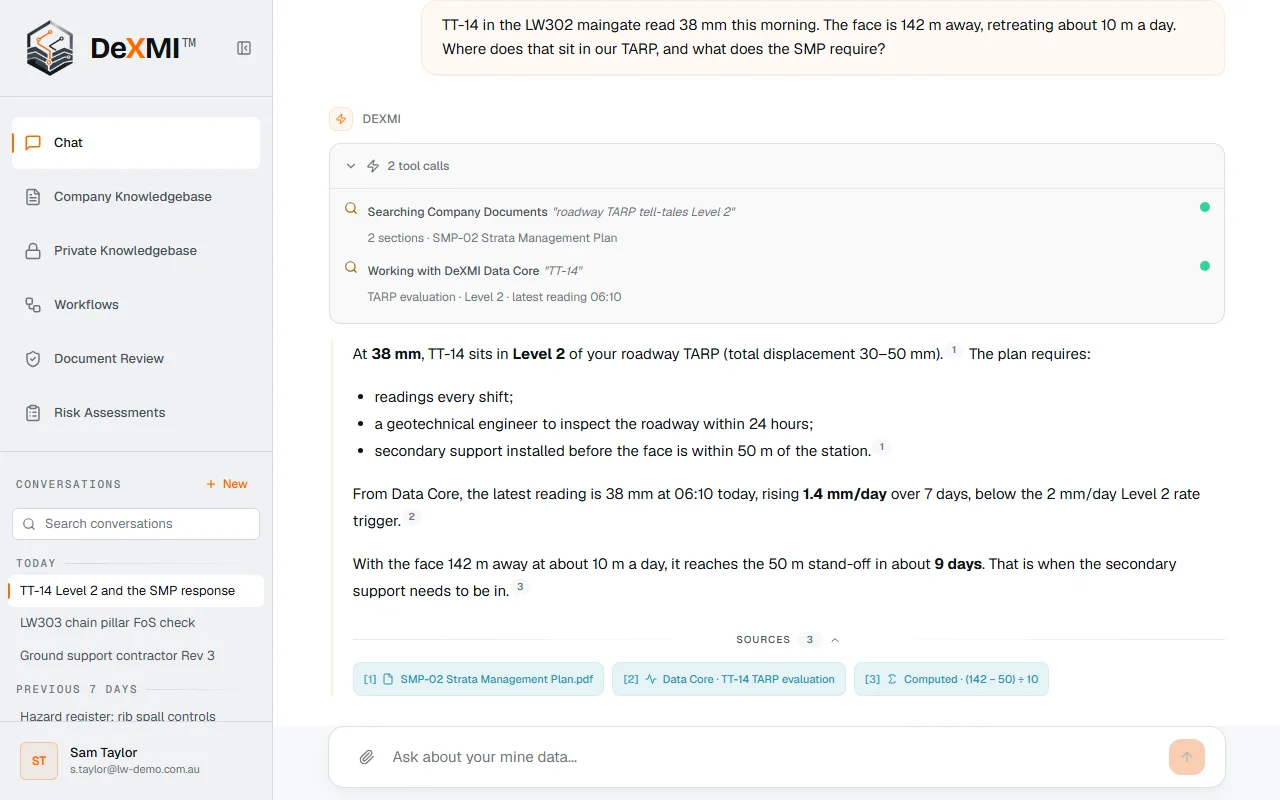
Company-level knowledge bases for the documents everyone relies on, and personal ones for your own working files. Ask in plain language and DeXMI answers in your site’s terms, pointing every claim to the document and section it came from, and saying so when the sources don’t support an answer.
How it works
From your documentation to a checked answer
Load your documentation
PDF, Word, Excel, PowerPoint, CSV, text and scanned images, file by file or whole folders.
Ask in plain language
The way you would ask a colleague; @-mention a document to go straight to it.
Read properly
Whole documents, tables as tables and scanned pages, searched by meaning and exact term.
Answer with the working
Every claim cites its source, and connected Data Core readings come in where they matter.
What you get
Company knowledge and your own, in one place
Company knowledge bases
Management plans, standards and procedures shared with everyone who should see them, managed by your admins.
Personal knowledge bases
Your own notes, drafts and working files, private to you and used only in your answers.
Every claim sourced
Answers point to the document, section or record behind each statement.
Says when it can’t
If the sources don’t support an answer, it says so instead of guessing.
Role-based access
People only see the documents their role allows, including in answers.
Never trained on
Your documents never train models or influence answers for anyone else.
Questions
Document Intelligence questions
Which documents can DeXMI read?
PDF, Word, Excel and PowerPoint, CSV, Markdown and plain text, and images (PNG, JPEG, TIFF, BMP).
Does it only answer from our documents?
It also uses Data Core records you connect, DeXMI’s curated mining knowledge base and, where enabled, the web. Answers cite what they used.
Who can see our documents?
Only people in your company, and only what their role allows.